Introduction
Have you ever wondered what unfolds behind the scenes when you type google.com into your browser and hit Enter? The seemingly simple act of accessing a website sets off a chain reaction of complex processes involving various components of the internet infrastructure. From DNS requests to database interactions, this post dives into the journey of your browser request for google.com and the role each layer plays in making it all work.
DNS Request
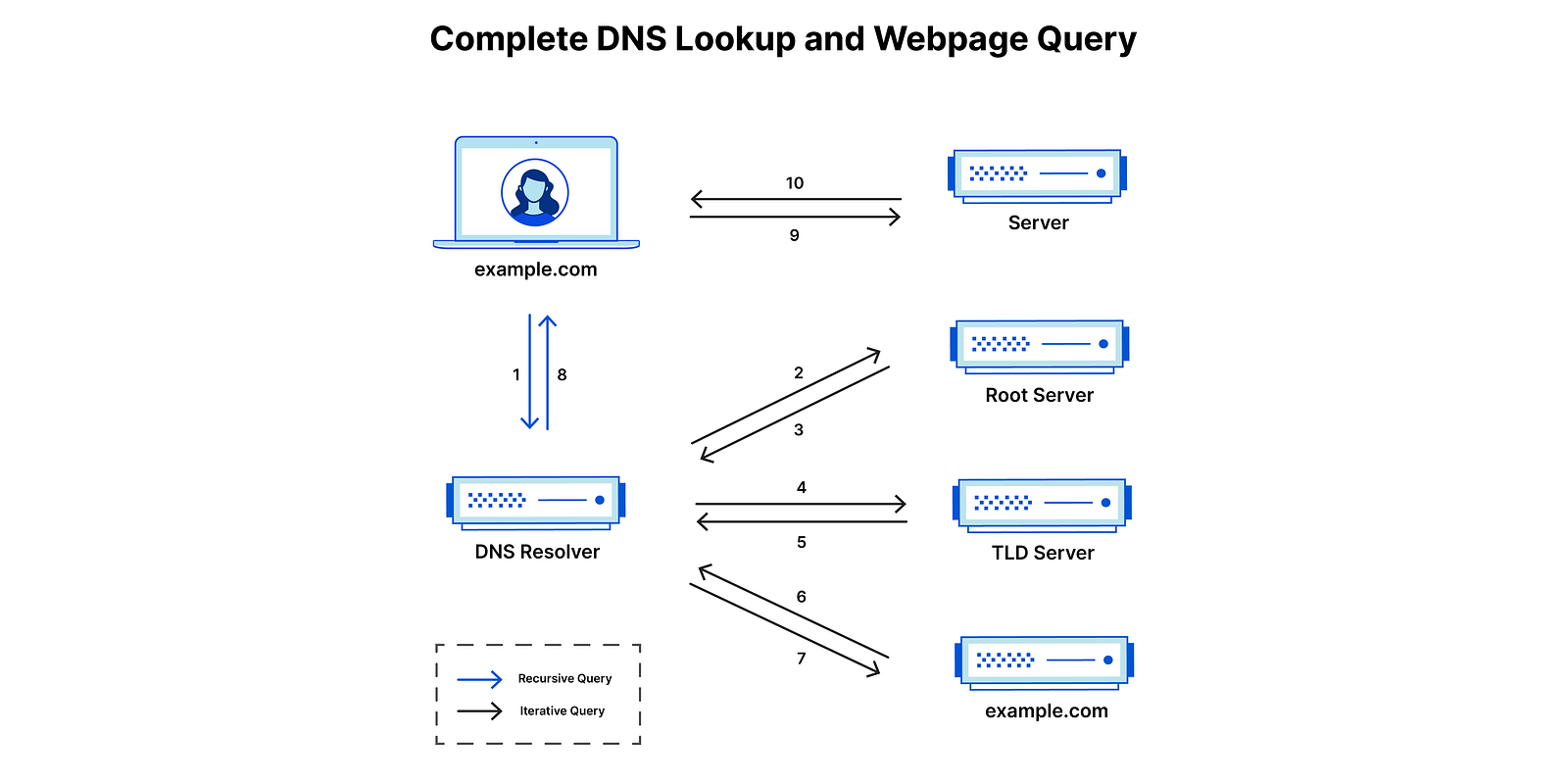
The Domain Name System (DNS) functions as the "phonebook" of the internet. Just as we cannot contact someone without a phone number, web pages require numeric addresses to communicate with each other. DNS resolves our inability to memorize the IP addresses of the websites or services we frequently visit.
The process of DNS resolution converts a hostname, such as www.google.com, into a computer-friendly IP address, like 192.168.1.1.
An IP address is assigned to each device on the internet, and this is vital for locating and communicating with each device.
Whenever we type a domain name like google.com, several processes happen behind the scenes. The browser first checks its cache to see whether a recent DNS record already exists for that domain.
- If so, it will use the IP address in the cache to send a request to the server.
- If the browser cache does not contain a recent DNS record, or if the DNS record has changed since it was last cached, the browser sends a request to a DNS resolver.
DNS Lookup Process
This process is used when the browser cannot find the DNS record in its own cache or the OS cache.
- The browser sends a request to a local DNS resolver, usually provided by the internet service provider (ISP).
- The local DNS server checks its cache for a recent copy of the DNS record. If found, it sends the IP address back to the browser.
- If the local resolver does not have the record, it sends a request to the root server.
- The root server sits at the top of the DNS hierarchy. It does not know the final IP, but it redirects the resolver to the TLD server.
- The local DNS resolver sends a request to the TLD nameserver.
- The TLD server stores address information for top-level domains. It also does not know the final IP, but it redirects the resolver to the authoritative nameserver.
- The authoritative nameserver is responsible for the domain record, including the IP address, and responds to the resolver with that IP.
- The local DNS resolver sends the IP address back to the browser.
- The browser sends a request to the server at the IP address to retrieve the webpage.
Once the IP address is resolved, it is cached by the local DNS resolver and the browser so future requests can be resolved faster.
The length of time that the DNS record is cached (the "TTL," or Time To Live) is determined by the authoritative nameserver and can be configured by the domain owner.
TCP/IP Connection
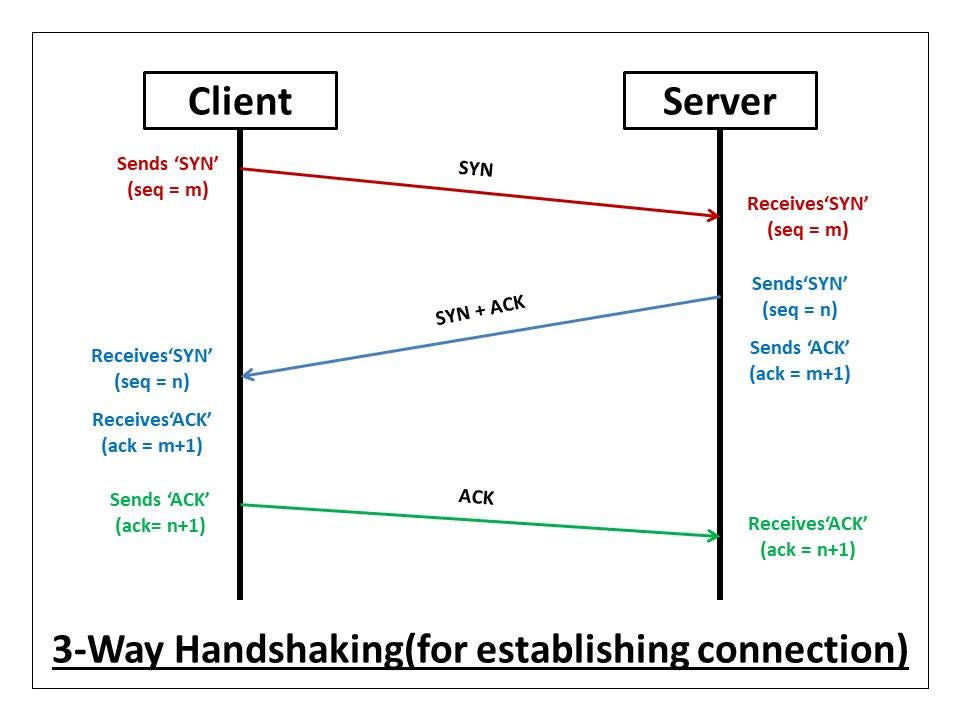
TCP/IP stands for Transmission Control Protocol/Internet Protocol and is a suite of communication protocols used to interconnect network devices on the internet. TCP/IP is also used as a communications protocol in a private computer network (an intranet or extranet).
The process of establishing a TCP/IP connection involves several steps:
- Host discovery: To know which device we should connect to, we need that device's IP address, which is obtained through DNS resolution.
- Three-way handshake:
- SYN (Synchronize): The client sends a segment to initiate communication. This segment contains a sequence number.
- SYN-ACK (Synchronize-Acknowledgment): The server responds with a SYN-ACK signal. ACK confirms it received the SYN flag, and SYN includes the server sequence number.
- ACK (Acknowledgment): The client acknowledges the server response, and both sides establish a stable connection for data transfer.
- Data transfer: With the connection established, data can be sent in both directions. TCP ensures data is delivered reliably and in the correct order.
Firewall
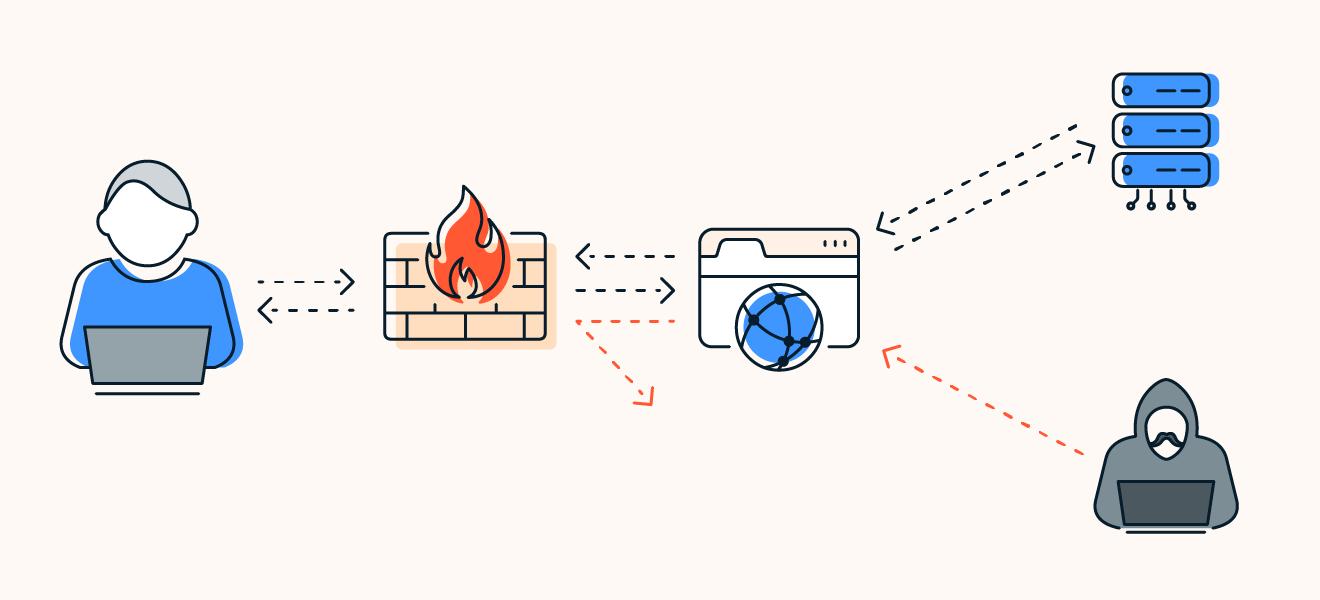
A firewall is a network security device, either software or hardware, that monitors all incoming and outgoing traffic based on predefined security rules. It accepts, rejects, or drops specific traffic.
Firewalls are generally of two types: Host-based and Network-based.
- Host-based firewalls: A software application (or suite) that comes as part of the OS. It is installed on each node and controls inbound and outbound packets.
- Network-based firewalls: Operate at the network level and filter incoming and outgoing traffic across the network to protect internal systems.
HTTPS/SSL
HTTPS, or Hypertext Transfer Protocol Secure, is a secure communication protocol used for transmitting data over the internet. It is an extension of HTTP (Hypertext Transfer Protocol) designed to ensure the confidentiality and integrity of data exchanged between a user's browser and a website.
TLS, short for Transport Layer Security, and SSL, short for Secure Socket Layer, are cryptographic protocols that encrypt data and authenticate a connection when moving data on the internet.
In the process of establishing a secure connection when a client wants to communicate with a website using the HTTPS version, the following steps are involved:
- The client sends a "ClientHello" message to the server, informing the server about the TLS version and cipher suites it can support.
- The server sends back a "ServerHello" message containing its public key, digital certificate, and the selected cryptographic algorithm.
- The client performs authentication by contacting the server's certificate authority (CA) to validate the web server digital certificate.
- The server and client perform key exchange, typically using either RSA or Diffie-Hellman.
- Subsequently, they securely exchange data.
HTTPS, TLS, and SSL are integral for secure internet data transmission. These protocols establish secure connections, encrypt data, and authenticate users. Embracing them is crucial for protecting online information and ensuring trust.
Load Balancer
A load balancer is a network device or software application that distributes incoming traffic across multiple servers or resources to prevent overloading any single server and increase overall system capacity.
Web Server
A web server is a software or hardware system that stores, processes, and serves web content to users or other devices over the internet. It functions by responding to requests made by web clients (usually web browsers) and delivering the requested web pages, images, videos, or other data.
This means that Google's server will receive a request from the load balancer when a user tries to access google.com.
The web server would then handle the request and produce a response, which would usually consist of the HTML, CSS, and JavaScript files that make up the web page.
The web server would then send this response back to the load balancer, which forwards it to the browser. The browser then uses the HTML, CSS, and JavaScript files to render the page.
Application Server and Database
Unlike the web server, the application server handles dynamic content. When using google.com, the application server is responsible for generating dynamic search results (which change based on the query submitted).
When you submit a search query to Google, the request is first sent to the load balancer, which forwards it to one of the web servers in the Google server network. The web server then sends the request to the application server, which processes the request and generates the search results.
Depending on the complexity of the search query, the application server may need to make a request to a database in order to retrieve the necessary data.
For example, if you are searching for a specific product on an e-commerce website, the application server may need to retrieve information about the product from a database.
Once the application server has obtained the necessary data, it sends it back to the web server, which includes it in the response that is sent back to the browser. The browser then uses this information to display the search results to you.
Conclusion
Although this seems like a very tedious prolonged process, we know that it takes less than seconds for a web page to render after we hit enter on our keyboard. All of these steps happen within milliseconds before we could even notice.
I hope this article helps answer the question: "What happens when you type a URL in the browser and press Enter?"